It's sometimes easy to take the little things in life for granted: a haircut, a shower, shoes or even a phone number. Sometimes life doesn't turn out the way we planned, and those little luxuries become much harder to come by.
Project CARE is a program to provide free Google Voice phone numbers and voicemail accounts to homeless individuals. The Google Voice team has been offering this program in the San Francisco Bay Area for more than two years, and we're excited to bring Project CARE to a new city.
On Saturday, Google Voice will join dozens of other Washington, D.C. organizations at the Winterhaven Homeless Veterans Stand Down at the D.C. Veterans Affairs Medical Center to try and make life a little easier for hundreds of veterans in the Washington, D.C. area. We will be handing out Project CARE cards and helping attendees set up unique phone numbers and voicemail accounts, which they can use when applying for jobs or filling out medical forms, or share with family.
In today's connected world, many of us don't think twice about picking up the phone to place or receive a call. However, for a homeless individual, a phone number can be an important lifeline, connecting you with prospective employers, health care providers, family and friends. We hope these Project CARE phone numbers provide homeless veterans with a way to reconnect with those they've lost touch with over the years.
Showing posts with label apps. Show all posts
Showing posts with label apps. Show all posts
Friday, January 22, 2010
Google Apps highlights – 1/22/2010
This is part of a regular series of Google Apps updates that we post every couple of weeks. Look for the label "Google Apps highlights" and subscribe to the series. - Ed.
The Google Apps team has had another productive couple of weeks. We released a number of helpful new features, and were happy to welcome new customers to the future of computing.
Upload any file to Google Docs
Last Tuesday, we began rolling out the ability for you to upload any type of file to Google Docs, not just documents, spreadsheets, presentations and PDFs. This lets you access and share anything up to 250MB from the cloud. You get 1GB of storage for uploaded files for free, and you can purchase additional storage for file uploads. (Additional storage plans are coming soon for schools and businesses, too.)

Google Apps Premier Edition customers can also use the Google Documents List Data API to programatically add files to Google Docs, and purchase third-party applications so employees can sync files between their computers and Google Docs.
Default https access for Gmail
In the past, you had the option to always use https encryption in Gmail to help protect your data as it travels between your browser and our servers. After evaluating the trade-offs between security and latency, as of last week https encryption is now the default in Gmail.
If you trust your network's security and want to disable always-on https for performance reasons, you can change your preferences in Gmail settings. Employees and students whose admins have not already defaulted their entire organizations to https will also see this option. The Gmail sign-in page will still always use https to help keep your password safe.
Who's gone Google?
Sanmina-SCI is a leading Electronics Manufacturing Services (EMS) provider to many industries including the communications, medical, defense and aerospace, industrial and renewable energy sectors. Sanmina-SCI rigorously evaluated and smoothly deployed Google Apps to their multi-lingual, global workforce of 15,000 employees. Not only did Sanmina-SCI achieve significant cost savings over upgrading their outdated Microsoft Exchange environment, deploying Google Apps has resulted in better customer service, streamlined business processes and increased flexibility.
We also witnessed a flurry of schools going Google after winter break. A very warm welcome to North Carolina State University, the Byron School District, Griffith University, Seattle Central Community College and Macquarie University!
If your school or business is ready to go Google too, take a look at our tips and best practices for deploying Google Apps.
We hope these updates help you get even more from Google Apps. For details and the latest news in this area, check out the Google Apps Blog.
The Google Apps team has had another productive couple of weeks. We released a number of helpful new features, and were happy to welcome new customers to the future of computing.
Upload any file to Google Docs
Last Tuesday, we began rolling out the ability for you to upload any type of file to Google Docs, not just documents, spreadsheets, presentations and PDFs. This lets you access and share anything up to 250MB from the cloud. You get 1GB of storage for uploaded files for free, and you can purchase additional storage for file uploads. (Additional storage plans are coming soon for schools and businesses, too.)
Google Apps Premier Edition customers can also use the Google Documents List Data API to programatically add files to Google Docs, and purchase third-party applications so employees can sync files between their computers and Google Docs.
Default https access for Gmail
In the past, you had the option to always use https encryption in Gmail to help protect your data as it travels between your browser and our servers. After evaluating the trade-offs between security and latency, as of last week https encryption is now the default in Gmail.
If you trust your network's security and want to disable always-on https for performance reasons, you can change your preferences in Gmail settings. Employees and students whose admins have not already defaulted their entire organizations to https will also see this option. The Gmail sign-in page will still always use https to help keep your password safe.
Who's gone Google?
Sanmina-SCI is a leading Electronics Manufacturing Services (EMS) provider to many industries including the communications, medical, defense and aerospace, industrial and renewable energy sectors. Sanmina-SCI rigorously evaluated and smoothly deployed Google Apps to their multi-lingual, global workforce of 15,000 employees. Not only did Sanmina-SCI achieve significant cost savings over upgrading their outdated Microsoft Exchange environment, deploying Google Apps has resulted in better customer service, streamlined business processes and increased flexibility.
We also witnessed a flurry of schools going Google after winter break. A very warm welcome to North Carolina State University, the Byron School District, Griffith University, Seattle Central Community College and Macquarie University!
If your school or business is ready to go Google too, take a look at our tips and best practices for deploying Google Apps.
We hope these updates help you get even more from Google Apps. For details and the latest news in this area, check out the Google Apps Blog.

Tuesday, January 12, 2010
Upload your files and access them anywhere with Google Docs
Over the next few weeks, we’re rolling out the ability to upload all file types to the cloud through Google Docs, giving you one place where you can upload and access your key files online. Because Google Docs now supports files up to 250 MB in size, which is larger than the attachment limit on most email applications, you’ll be able to backup large graphics files, RAW photos, ZIP archives and much more to the cloud. More importantly, instead of carrying a USB drive, you can now use Google Docs as a more convenient option for accessing your files on different computers.
This feature can also help you work with teams to organize and collaborate on information online. For example, an architect can share large schematic files with her construction firm, while a P.T.A. member can share large graphic files for posters with other members. You can even add these files to the same shared project folder your team has already been using to collaborate on documents and spreadsheets.
In addition to uploading any file into Google Docs, our Google Apps Premier Edition customers will be able to seamlessly upload many files at once and sync them with their desktop in real time using third party applications. You can read more about how the ability to upload any file will help businesses on the Google Enterprise blog.
This feature will be enabled for your account over the next couple of weeks — look for the bubble notification when you sign in to Google Docs. For more information, check out our post on the Google Docs blog.
This feature can also help you work with teams to organize and collaborate on information online. For example, an architect can share large schematic files with her construction firm, while a P.T.A. member can share large graphic files for posters with other members. You can even add these files to the same shared project folder your team has already been using to collaborate on documents and spreadsheets.
In addition to uploading any file into Google Docs, our Google Apps Premier Edition customers will be able to seamlessly upload many files at once and sync them with their desktop in real time using third party applications. You can read more about how the ability to upload any file will help businesses on the Google Enterprise blog.
This feature will be enabled for your account over the next couple of weeks — look for the bubble notification when you sign in to Google Docs. For more information, check out our post on the Google Docs blog.
Friday, December 18, 2009
Tips and tricks for deploying Google Apps
Has your company, school or organization decided to "go Google" — but not yet fully "gone?" Perhaps you'd like more guidance on the technical, marketing or training details? Or maybe you could use some resources to help you deploy? Making the decision to go Google can be the easiest part, but we realize that it sometimes takes a little boost to finish the process, which is where we come in.
Our Google Apps Deployment team has assisted hundreds of organizations — large and small — make the switch to Google Apps. To ensure that your implementation is a success, we've developed step-by-step tools to guide you through the process, and best practices to make your transition as smooth and easy as possible. Here are some of the resources you can explore when going Google:
Sign up for a Deployment Training Webinar. In this live session, a deployment specialist will walk you through the deployment planning steps and use cases.

Take advantage of our deployment guides, which include creative examples and templates, to help with your technical and marketing rollout:
Recently, we also launched two learning sites to jump start your transition to Google Apps: the customizable Google Enterprise Launch Site for large enterprises and the Apps Learning Center for small businesses. You can find out more about these Google site templates in the Enterprise Deployment Site.
To find answers to your technical questions about Google Apps, visit the Administrator Help Center. We also provide overviews and videos for integration and migration tools, including Microsoft Outlook Sync, Google Blackberry Enterprise Server Connector and Lotus Notes Migration.
We hope these resources help with your move to Google Apps, and we can't wait to welcome you to the Google Apps family.
Our Google Apps Deployment team has assisted hundreds of organizations — large and small — make the switch to Google Apps. To ensure that your implementation is a success, we've developed step-by-step tools to guide you through the process, and best practices to make your transition as smooth and easy as possible. Here are some of the resources you can explore when going Google:
Sign up for a Deployment Training Webinar. In this live session, a deployment specialist will walk you through the deployment planning steps and use cases.

Take advantage of our deployment guides, which include creative examples and templates, to help with your technical and marketing rollout:
Recently, we also launched two learning sites to jump start your transition to Google Apps: the customizable Google Enterprise Launch Site for large enterprises and the Apps Learning Center for small businesses. You can find out more about these Google site templates in the Enterprise Deployment Site.
To find answers to your technical questions about Google Apps, visit the Administrator Help Center. We also provide overviews and videos for integration and migration tools, including Microsoft Outlook Sync, Google Blackberry Enterprise Server Connector and Lotus Notes Migration.
We hope these resources help with your move to Google Apps, and we can't wait to welcome you to the Google Apps family.
Monday, December 14, 2009
Cloud apps, big city: LA goes Google
This fall we've seen lots of government agencies decide to make the switch to cloud computing, joining the many businesses already using Google Apps for email and collaboration at work. Today we'd like to officially welcome another customer to the mix: the City of Los Angeles. Starting today, Los Angeles will be equipping 34,000 city employees with Google Apps for email and collaboration in the cloud.
The story of Los Angeles moving to Google Apps started early this year, when the city's Chief Technology Officer, Randi Levin, and her team at the Information Technology Agency (ITA) looked to replace their aging, on-premise system with more secure, productivity-focused technology. After calling for proposals and carefully evaluating over 14 different ones, Randi and the ITA decided to revamp the city government's email technology by adopting Google Apps. Los Angeles' going Google will help the city on a number of fronts. The cloud computing system will improve the security and reliability of city email, transitioning from servers in the City Hall basement to hosted, secure data centers. Employees will also have a new avenue for collaboration with Google Apps in the cloud: sharing docs, sites and videos and editing them together in realtime as they work on making the city run more smoothly and efficiently and thus better serving Angelenos city-wide. Furthermore, Randi and her team realized that moving to Apps would mean less taxpayer money spent on IT — valuable budget that can be rededicated to other city efforts over the next few years.
Check out this video to hear more from Randi on Los Angeles and Apps.
Los Angeles is the second-largest city in the U.S., and the latest in a string of cities, like Washington D.C. and Orlando, FL, to go Google. With this switch to the cloud, Los Angeles joins the group of leaders on the innovation front — not only with regard to budget but technology as well. Bringing in cloud applications will make city work more efficient, which is great for Los Angeles residents too. Read more from Randi on the Google Enterprise blog, and stay tuned to follow Los Angeles' Google Apps story, and to learn about other governments moving to the cloud.
The story of Los Angeles moving to Google Apps started early this year, when the city's Chief Technology Officer, Randi Levin, and her team at the Information Technology Agency (ITA) looked to replace their aging, on-premise system with more secure, productivity-focused technology. After calling for proposals and carefully evaluating over 14 different ones, Randi and the ITA decided to revamp the city government's email technology by adopting Google Apps. Los Angeles' going Google will help the city on a number of fronts. The cloud computing system will improve the security and reliability of city email, transitioning from servers in the City Hall basement to hosted, secure data centers. Employees will also have a new avenue for collaboration with Google Apps in the cloud: sharing docs, sites and videos and editing them together in realtime as they work on making the city run more smoothly and efficiently and thus better serving Angelenos city-wide. Furthermore, Randi and her team realized that moving to Apps would mean less taxpayer money spent on IT — valuable budget that can be rededicated to other city efforts over the next few years.
Check out this video to hear more from Randi on Los Angeles and Apps.
Los Angeles is the second-largest city in the U.S., and the latest in a string of cities, like Washington D.C. and Orlando, FL, to go Google. With this switch to the cloud, Los Angeles joins the group of leaders on the innovation front — not only with regard to budget but technology as well. Bringing in cloud applications will make city work more efficient, which is great for Los Angeles residents too. Read more from Randi on the Google Enterprise blog, and stay tuned to follow Los Angeles' Google Apps story, and to learn about other governments moving to the cloud.
Tuesday, December 8, 2009
Join this group: Google Groups joins Google Apps
Blogs, wikis, social networks, YouTube and Twitter are changing how many of us connect with others. Yet within most businesses, especially large corporations, the software hasn't evolved much over the last decade. While traditional business technologies give companies the necessary security and controls, they do so at the expense of rapid innovation. Businesses shouldn't have to make this compromise.
This is one reason why customers are so enthusiastic about Google Apps. It offers enterprise-grade security and control while letting businesses instantly tap into a swift stream of innovation, based on services tested by hundreds of millions of people around the world. We've launched over 100 improvements to Google Apps in the last year, and the pace of innovation continues to increase.
Today, we're happy to announce the launch of Google Groups to Google Apps Premier and Education Edition users. Google Groups is one of our most widely used applications, enabling everyone from the local hiking club to the family next door to create mailing lists and discussion forums. Now employees within a company can create groups for their departments, their teams or their projects. Employees can use these groups as mailing lists, but they can also share documents, spreadsheets, presentations, calendars, videos and sites with groups, instead of many individual recipients. They can choose to receive communications directly to their email inbox, in a digest format, or in the Groups forum view, and can access all the information in the groups archive, without the intervention of an IT administrator.
Google Groups is a boon for IT administrators too. After enabling the new service from the administrative control panel (add "user-managed groups"), users can start managing their own groups without burdening administrators for support. Administrators can still set group policies and manage other group settings. If you want to learn more, check out our post on the Enterprise Blog.
Google Groups is just one of the many consumer features that we've tailored for the enterprise since we launched Google Apps for businesses nearly three years ago, and we're looking forward to bringing more innovation to our customers in the months and years ahead.
This is one reason why customers are so enthusiastic about Google Apps. It offers enterprise-grade security and control while letting businesses instantly tap into a swift stream of innovation, based on services tested by hundreds of millions of people around the world. We've launched over 100 improvements to Google Apps in the last year, and the pace of innovation continues to increase.
Today, we're happy to announce the launch of Google Groups to Google Apps Premier and Education Edition users. Google Groups is one of our most widely used applications, enabling everyone from the local hiking club to the family next door to create mailing lists and discussion forums. Now employees within a company can create groups for their departments, their teams or their projects. Employees can use these groups as mailing lists, but they can also share documents, spreadsheets, presentations, calendars, videos and sites with groups, instead of many individual recipients. They can choose to receive communications directly to their email inbox, in a digest format, or in the Groups forum view, and can access all the information in the groups archive, without the intervention of an IT administrator.
Google Groups is a boon for IT administrators too. After enabling the new service from the administrative control panel (add "user-managed groups"), users can start managing their own groups without burdening administrators for support. Administrators can still set group policies and manage other group settings. If you want to learn more, check out our post on the Enterprise Blog.
Google Groups is just one of the many consumer features that we've tailored for the enterprise since we launched Google Apps for businesses nearly three years ago, and we're looking forward to bringing more innovation to our customers in the months and years ahead.
Wednesday, December 2, 2009
Spread some holiday cheer, one card at a time
(Cross-posted from the Gmail Blog)
Every year around this time I start thinking about the annual holiday email I send to friends and family members. I usually email my mom, dad, sister, friends and co-workers. But the one person who appreciates my season's greetings the most — my grandma — is stuck in the pre-digital age of snail-mail. Of course, I could go to a store, aimlessly wander through the aisles, choose a card, wait in line to pay for it, go to the post office, pick up some stamps, etc., etc. — but wouldn't it be so much easier just to fill out a form and have Gmail handle the rest?
This holiday season, as a token of our appreciation to our most enthusiastic fans, we'll snail-mail a free holiday postcard on your behalf. Yes, through the mail and everything.

To send a card, visit gmail.com/holidaycard. We'll only be able to send cards to U.S. addresses and to a limited number of people (due to limited Gmail elf availability), so be sure to request one soon.
And if you're headed home for the holidays, consider spending some "computer time" with loved ones who aren't as up-to-date with technology. With some luck, maybe this time next year you'll be able to email them a holiday card instead!
Wishing a happy holiday to you and yours!
Every year around this time I start thinking about the annual holiday email I send to friends and family members. I usually email my mom, dad, sister, friends and co-workers. But the one person who appreciates my season's greetings the most — my grandma — is stuck in the pre-digital age of snail-mail. Of course, I could go to a store, aimlessly wander through the aisles, choose a card, wait in line to pay for it, go to the post office, pick up some stamps, etc., etc. — but wouldn't it be so much easier just to fill out a form and have Gmail handle the rest?
This holiday season, as a token of our appreciation to our most enthusiastic fans, we'll snail-mail a free holiday postcard on your behalf. Yes, through the mail and everything.

To send a card, visit gmail.com/holidaycard. We'll only be able to send cards to U.S. addresses and to a limited number of people (due to limited Gmail elf availability), so be sure to request one soon.
And if you're headed home for the holidays, consider spending some "computer time" with loved ones who aren't as up-to-date with technology. With some luck, maybe this time next year you'll be able to email them a holiday card instead!
Wishing a happy holiday to you and yours!
Friday, November 20, 2009
Google Apps highlights – 11/20/2009
This is part of a regular series of Google Apps updates that we post every couple of weeks. Look for the label "Google Apps highlights" and subscribe to the series. - Ed.
Over the last two weeks, we've made improvements across Google Apps, some geared for individuals, others meant for business customers.
Green Robot icon in Gmail Labs
The green, orange and red chat bubbles in Gmail signal if your contacts are online, idle or unavailable, but as more people sign in from mobile devices, it's becoming harder to tell when someone is actually online at a computer or just connected with their phone. The Green Robot feature in Gmail Labs helps you spot when you might want to tailor your exchanges with more succinct messages for people who are signed in with Android-powered devices. Look for the green beaker icon at the top of Gmail to enable Green Robot and other Labs features.

Site templates
On Tuesday we launched templates for Google Sites. The templates gallery is filled with useful example sites ranging from wedding websites to corporate intranets, which you can copy and customize so they're just right. This lets you create a useful, visually appealing collaborative workspace in seconds. And if you have a great site other people would find useful, you can submit it to the gallery. If your business uses Google Sites, templates you submit stay private within your company.

More overflow storage for less
If you're using Google Apps to store photos with Picasa Web Albums and manage large volumes of personal email, you'll be happy to hear we're now offering more extra storage for less. Our new overflow storage plans start at $5 per year for 20 GB. For the most avid shutterbugs, the 16 TB plan is enough space for roughly 8 million high resolution pictures!

Improvements to Sync for Outlook
Last week, we released an update to Google Apps Sync for Microsoft Outlook, our tool that lets companies stop running Microsoft Exchange while still letting some employees use the familiar Outlook interface. Now, employees can sync multiple calendars between Outlook and Google Apps, and look up free/busy information from Exchange for co-workers who haven't migrated to Google Apps yet.
Google Apps Premier Edition innovation – Year in review
Businesses using Google Apps not only save money compared to running their own email systems, but also their employees get access to innovation at a much faster pace than with conventional business technologies. We've launched over 100 improvements to Google Apps in the last year, and on Thursday I hosted a webcast to recap noteworthy recent updates for businesses, including push email, contacts and calendar support for BlackBerry, iPhone, Windows Mobile and Android, Sync for Microsoft Outlook, offline access and more. If you missed the webcast, you can watch it on YouTube.
Who's gone Google?
This week I'm pleased to welcome a new crop of companies, schools and public agencies that have recently switched to Google Apps, including Delta Hotels, Michigan State University, the City of Orlando and the Office of the New Mexico Attorney General. The Motorola Mobile Devices Division deployed Google Apps to its employees this week, and the Los Angeles City Council recently voted unanimously to move 30,000 city employees to Google Apps.
We hope these updates help you get even more from Google Apps. For details and the latest news in this area, check out the Google Apps Blog.
Over the last two weeks, we've made improvements across Google Apps, some geared for individuals, others meant for business customers.
Green Robot icon in Gmail Labs
The green, orange and red chat bubbles in Gmail signal if your contacts are online, idle or unavailable, but as more people sign in from mobile devices, it's becoming harder to tell when someone is actually online at a computer or just connected with their phone. The Green Robot feature in Gmail Labs helps you spot when you might want to tailor your exchanges with more succinct messages for people who are signed in with Android-powered devices. Look for the green beaker icon at the top of Gmail to enable Green Robot and other Labs features.

Site templates
On Tuesday we launched templates for Google Sites. The templates gallery is filled with useful example sites ranging from wedding websites to corporate intranets, which you can copy and customize so they're just right. This lets you create a useful, visually appealing collaborative workspace in seconds. And if you have a great site other people would find useful, you can submit it to the gallery. If your business uses Google Sites, templates you submit stay private within your company.

More overflow storage for less
If you're using Google Apps to store photos with Picasa Web Albums and manage large volumes of personal email, you'll be happy to hear we're now offering more extra storage for less. Our new overflow storage plans start at $5 per year for 20 GB. For the most avid shutterbugs, the 16 TB plan is enough space for roughly 8 million high resolution pictures!

Improvements to Sync for Outlook
Last week, we released an update to Google Apps Sync for Microsoft Outlook, our tool that lets companies stop running Microsoft Exchange while still letting some employees use the familiar Outlook interface. Now, employees can sync multiple calendars between Outlook and Google Apps, and look up free/busy information from Exchange for co-workers who haven't migrated to Google Apps yet.
Google Apps Premier Edition innovation – Year in review
Businesses using Google Apps not only save money compared to running their own email systems, but also their employees get access to innovation at a much faster pace than with conventional business technologies. We've launched over 100 improvements to Google Apps in the last year, and on Thursday I hosted a webcast to recap noteworthy recent updates for businesses, including push email, contacts and calendar support for BlackBerry, iPhone, Windows Mobile and Android, Sync for Microsoft Outlook, offline access and more. If you missed the webcast, you can watch it on YouTube.
Who's gone Google?
This week I'm pleased to welcome a new crop of companies, schools and public agencies that have recently switched to Google Apps, including Delta Hotels, Michigan State University, the City of Orlando and the Office of the New Mexico Attorney General. The Motorola Mobile Devices Division deployed Google Apps to its employees this week, and the Los Angeles City Council recently voted unanimously to move 30,000 city employees to Google Apps.
We hope these updates help you get even more from Google Apps. For details and the latest news in this area, check out the Google Apps Blog.
Monday, November 16, 2009
Templates now available in Google Sites
I'm pleased to announce we just added a stocked gallery of site templates in Google Sites. Anyone can browse the public template gallery, and businesses using Google Apps each have a private area where employees can share site templates with coworkers.
The rate that businesses are adopting Google Sites has surpassed our expectations, and templates will make Sites even more useful by dramatically reducing the time it takes to set up collaborative workspaces like employee intranets, project tracking sites, team sites and employee profile pages. Templates let you quickly start a new site with pre-built content, embedded gadgets, page layouts, navigation links, theming and more.

You can find more about what's new and read stories from customers about why they switched to Google Sites from on-premises collaboration solutions on the Google Enterprise Blog.
And because many of you are managing personal projects with Google Sites, we also added templates for family sites, weddings, neighborhood associations, clubs, charitable causes and more to the public gallery. Check out the Google Docs Blog for other examples and details, and if you have a personal site that others could use as a template, please submit your work to the public gallery!

The rate that businesses are adopting Google Sites has surpassed our expectations, and templates will make Sites even more useful by dramatically reducing the time it takes to set up collaborative workspaces like employee intranets, project tracking sites, team sites and employee profile pages. Templates let you quickly start a new site with pre-built content, embedded gadgets, page layouts, navigation links, theming and more.
You can find more about what's new and read stories from customers about why they switched to Google Sites from on-premises collaboration solutions on the Google Enterprise Blog.
And because many of you are managing personal projects with Google Sites, we also added templates for family sites, weddings, neighborhood associations, clubs, charitable causes and more to the public gallery. Check out the Google Docs Blog for other examples and details, and if you have a personal site that others could use as a template, please submit your work to the public gallery!
Thursday, November 12, 2009
Gone Google at EDUCAUSE 2009
Last week the Google Apps for Education team headed to Denver for EDUCAUSE 2009 where the higher education community meets annually. It was at this conference three years ago that we first unveiled Google Apps for Education. Since then, we've witnessed staggering growth in the world of cloud computing in education. Lots has happened over the past year especially: more than 100 new features have rolled out in Google Apps, we've engaged well over six million students and faculty (a 400% increase since this time last year), launched free Google Message Security for K-12 schools and have integrated with other learning services such as Blackboard and Moodle.
These developments are just the beginning. According to the newly-released 2009 Campus Computing survey statistics, 44% of colleges and universities have converted to a hosted student email solution, while another 37% are currently evaluating the move. Of those that have migrated, over half — 56% precisely* — are going Google.
To toast the students and faculty that are shaping this movement, we hosted our customers and EDUCAUSE conference attendees at the Denver Public Library. Check out the photos to see what these schools have to say:
We also did something different this year and invited some student ambassadors from schools using Google Apps to come to Denver and share how using Apps on campus helps make their lives easier. Daniel Miller who works at University of Washington's Ethnic Cultural Center uses Calendar to let students on campus know about his organization's events. Sociology major Robin Brown uses forms in Docs to collect data for her class surveys at Notre Dame. Taylor Bell at Boise State relies on Gmail's filters and gadgets to seamlessly access to his Calendar, Docs, Tasks and Chat. After losing his journal, Vaughn Parker at Temple University created a Calendar to keep track of his assignments and share them with his classmates and professors. (There are many more of these student stories, too).
Every year, more schools move to Google Apps so they can spend their time focusing on students, not servers; on higher learning, not higher costs. If you're a school, you can go Google, too. Check out www.google.com/appsatschool to learn more.
These developments are just the beginning. According to the newly-released 2009 Campus Computing survey statistics, 44% of colleges and universities have converted to a hosted student email solution, while another 37% are currently evaluating the move. Of those that have migrated, over half — 56% precisely* — are going Google.
To toast the students and faculty that are shaping this movement, we hosted our customers and EDUCAUSE conference attendees at the Denver Public Library. Check out the photos to see what these schools have to say:
We also did something different this year and invited some student ambassadors from schools using Google Apps to come to Denver and share how using Apps on campus helps make their lives easier. Daniel Miller who works at University of Washington's Ethnic Cultural Center uses Calendar to let students on campus know about his organization's events. Sociology major Robin Brown uses forms in Docs to collect data for her class surveys at Notre Dame. Taylor Bell at Boise State relies on Gmail's filters and gadgets to seamlessly access to his Calendar, Docs, Tasks and Chat. After losing his journal, Vaughn Parker at Temple University created a Calendar to keep track of his assignments and share them with his classmates and professors. (There are many more of these student stories, too).
Every year, more schools move to Google Apps so they can spend their time focusing on students, not servers; on higher learning, not higher costs. If you're a school, you can go Google, too. Check out www.google.com/appsatschool to learn more.
*Update on 11/20: Among 4-year universities and colleges, the number is slightly higher, with 59% choosing Google Apps.
Tuesday, November 10, 2009
Twice the storage for a quarter of the price
(Cross-posted from the Google Photos Blog)
People today have more personal data online than ever before. More and more people are starting to move the bulk of their data off the desktop and into servers "in the cloud," where it's accessible from any computer or mobile device and easily shareable with friends and family. At the same time, digital photo technology is making it easier and cheaper than ever to take a lot of pictures, and client software like Picasa 3.5 makes it easier than ever to move photos from your camera to the cloud. That's why we've always given you lots of free storage in products like Picasa Web Albums and Gmail, and why for the past two years we've offered additional storage you can purchase if you need even more space.
While the cost of hard drive storage has continued to drop in these two years, we've also been working hard to improve our infrastructure to reduce your costs even further. Today we're dramatically lowering our prices to make extra storage even more affordable. You can now buy 20 GB for only $5 a year — that's twice as much storage for a quarter of the old price, and enough space for more than 10,000 full resolution pictures taken with a five megapixel camera. Since most people have less than 10 GB of photos, chances are you can now save all your memories online for a year for the cost of a triple mocha. If you need more than 20 GB, plans range all the way up to 16 TB, which is enough room for 8 million full resolution photos! And Google paid storage offers an extra level of security, protection and accessibility that you can't get with an external drive — at a similar cost per gigabyte.
As always, extra storage acts as an overflow that you only start using when you reach the limit of your free storage, and people who have extra storage will be automatically upgraded. So if you need more space for thousands of photos of your toddler, or if you're running out of room in your overflowing inbox, visit www.google.com/accounts/PurchaseStorage to see all the plans and to buy more storage.
People today have more personal data online than ever before. More and more people are starting to move the bulk of their data off the desktop and into servers "in the cloud," where it's accessible from any computer or mobile device and easily shareable with friends and family. At the same time, digital photo technology is making it easier and cheaper than ever to take a lot of pictures, and client software like Picasa 3.5 makes it easier than ever to move photos from your camera to the cloud. That's why we've always given you lots of free storage in products like Picasa Web Albums and Gmail, and why for the past two years we've offered additional storage you can purchase if you need even more space.
While the cost of hard drive storage has continued to drop in these two years, we've also been working hard to improve our infrastructure to reduce your costs even further. Today we're dramatically lowering our prices to make extra storage even more affordable. You can now buy 20 GB for only $5 a year — that's twice as much storage for a quarter of the old price, and enough space for more than 10,000 full resolution pictures taken with a five megapixel camera. Since most people have less than 10 GB of photos, chances are you can now save all your memories online for a year for the cost of a triple mocha. If you need more than 20 GB, plans range all the way up to 16 TB, which is enough room for 8 million full resolution photos! And Google paid storage offers an extra level of security, protection and accessibility that you can't get with an external drive — at a similar cost per gigabyte.
As always, extra storage acts as an overflow that you only start using when you reach the limit of your free storage, and people who have extra storage will be automatically upgraded. So if you need more space for thousands of photos of your toddler, or if you're running out of room in your overflowing inbox, visit www.google.com/accounts/PurchaseStorage to see all the plans and to buy more storage.
Monday, October 26, 2009
Liberate your Google Docs with Convert, Zip and Download
This past September, you may have heard about the launch of our Data Liberation site, a central place on the web detailing how you can easily move your data into or away from Google's cloud. Today, we're adding another product to our growing list of liberations: the "Convert, Zip and Download" feature in Google Docs, which allows you to download a bunch — or all — of your Docs simultaneously.
This new feature comes out of a collaboration between the Google Docs engineering team and Google's Data Liberation Front, a small team of engineers that aims to make it easy for you to transfer your personal data in and out of Google's services by building simple import and export functions.
"Convert, Zip and Download" now joins dozens of other liberation features across our product offerings, ranging from Blogger's full blog downloads to email export from Gmail using IMAP and POP3. The feature lets you bundle your Google Docs in a format of your choice (MS Office, Open Office, PDF, etc.) and download them as a zip file. No longer do you have to download each document individually, which can take a lot of time if you have hundreds of documents like I do! All you need to do is select the relevant Docs, click on "Export" from the "More Actions" menu and download them in one go. (Check out the Google Docs Blog for more details.)

We hope you find the new export feature useful. We strongly believe that you — not the products you use — should control your data, and be able to quickly and easily take that data out of any product without a hassle. We've already liberated more than half of our products, and are working hard to address the remaining challenges. Keep an eye out for more upcoming Data Liberations.
You can also take a deeper look into product liberation at dataliberation.org, follow us on Twitter @dataliberation or contribute suggestions for services that you think need to be liberated on our Data Liberation Moderator page.
This new feature comes out of a collaboration between the Google Docs engineering team and Google's Data Liberation Front, a small team of engineers that aims to make it easy for you to transfer your personal data in and out of Google's services by building simple import and export functions.
"Convert, Zip and Download" now joins dozens of other liberation features across our product offerings, ranging from Blogger's full blog downloads to email export from Gmail using IMAP and POP3. The feature lets you bundle your Google Docs in a format of your choice (MS Office, Open Office, PDF, etc.) and download them as a zip file. No longer do you have to download each document individually, which can take a lot of time if you have hundreds of documents like I do! All you need to do is select the relevant Docs, click on "Export" from the "More Actions" menu and download them in one go. (Check out the Google Docs Blog for more details.)

We hope you find the new export feature useful. We strongly believe that you — not the products you use — should control your data, and be able to quickly and easily take that data out of any product without a hassle. We've already liberated more than half of our products, and are working hard to address the remaining challenges. Keep an eye out for more upcoming Data Liberations.
You can also take a deeper look into product liberation at dataliberation.org, follow us on Twitter @dataliberation or contribute suggestions for services that you think need to be liberated on our Data Liberation Moderator page.
Thursday, October 22, 2009
Reading gets personal with Popular items and Personalized ranking
- Explore section - We're always trying to help you discover new stuff in Reader, and today we're introducing Popular items and Recommended sources, two ways to find interesting content from all over the Internet. We use algorithms to find top-rising images, videos and pages from anywhere (not just your subscriptions), collect them in the new Popular items section and order them by what we think you'll like best. Now you don't have to be embarrassed about missing that hilarious video everyone is talking about — it should show up in your Popular items feed automatically. And to make it easier to find interesting feeds, we're moving Recommendations into the new Explore section and giving it a new name — Recommended sources. Like always, it uses your Reader Trends and Web History (if you're opted into Web History) to generate a list of feeds we think you might like.
 Personalized ranking - Only have a 10-minute coffee break and want to see the best items first? All feeds now have a new sort option called "magic" that re-orders items in the feed based on your personal usage, and overall activity in Reader, instead of default chronological order. Click "Sort by magic" under the Folder Settings menu of your feed to switch to personalized ranking. Unlike the old "auto" ranking, this new ranking is personalized for you, and gets better with time as we learn what you like best — the more you "like" and "share" stuff, the better your magic sort will be. Give it a try on a high-volume feed folder or All items and see for yourself!

 The goal of personalization at Google remains the same as ever: to help you find the best content on the web. We hope these new features help you do just that — go Explore for yourself.
Finally, we'd love to hear your feedback — share your thoughts on our help group, Twitter or the Reader section of Get Satisfaction, a third party support community.
Monday, October 12, 2009
Shared folders and multiple file upload in Google Docs
Today, we are happy to launch one of the most requested Google Docs features — the ability to share folders. Shared folders make it easy for a team of people to collaborate on projects that require multiple documents, spreadsheets or presentations. If you have a group of items you want to share, all that you have to do is put them into one folder and share it.

Once you've shared a folder, all of the items in the folder will be accessible to the group. You can also add someone to an existing shared folder to give them access to all of the folder's content. Likewise, each item you add to the folder will be automatically shared. Just like with sharing documents, you can specify edit and view-only access for a folder.
In addition to sharing folders, you can now upload multiple files to Google Docs at the same time, simplifying the process of transferring documents from your desktop to the cloud. Once your documents are in the cloud, you can access them from any device connected to the Internet or share them with people you choose.
These features are currently rolling out and will be available to everyone by the end of the day. If you're interested in learning more, check out our post on the Google Docs blog.

Once you've shared a folder, all of the items in the folder will be accessible to the group. You can also add someone to an existing shared folder to give them access to all of the folder's content. Likewise, each item you add to the folder will be automatically shared. Just like with sharing documents, you can specify edit and view-only access for a folder.
In addition to sharing folders, you can now upload multiple files to Google Docs at the same time, simplifying the process of transferring documents from your desktop to the cloud. Once your documents are in the cloud, you can access them from any device connected to the Internet or share them with people you choose.
These features are currently rolling out and will be available to everyone by the end of the day. If you're interested in learning more, check out our post on the Google Docs blog.
Tuesday, September 29, 2009
Surf's up Wednesday: Google Wave update
Starting Wednesday, September 30 we'll be sending out more than 100,000 invitations to preview Google Wave to:
Some of you have asked what we mean by preview. This just means that Google Wave isn't quite ready for prime time. Not yet, anyway. Since first unveiling the project back in May, we've focused almost exclusively on scalability, stability, speed and usability. Yet, you will still experience the occasional downtime, a crash every now and then, part of the system being a bit sluggish and some of the user interface being, well, quirky.
There are also still key features of Google Wave that we have yet to fully implement. For example, you can't yet remove a participant from a wave or define groups of users, draft mode is still missing and you can't configure the permissions of users on a wave. We'll be rolling out these and other features as soon as they are ready — over the next few months.
Despite all this, we believe you will find that Google Wave has the potential for making you more productive when communicating and collaborating. Even when you're just having fun! We use it ourselves everyday for everything from planning pub crawls to sharing photos, managing release processes and debating features to writing design documents. In fact, we collaborated on this very blog post with several colleagues in Google Wave.
Speaking of ways you could potentially use Google Wave, we're intrigued by the many detailed ones people have taken the time to describe. To mention just a few: journalist Andy Ihnatko on producing his Chicago Sun-Times column, filmmaker Jonathan Poritsky on streamlining the movie-making process, scientist Cameron Neylon on academic papers and lab work, Alexander Dreiling and his SAP research team on collaborative business process modelling, and ZDNet's Dion Hincliffe on a host of enterprise use cases.
The Wave team's most fun day since May? We invited a group of students to come spend a day with us at Google's Sydney office. Among other things, we asked them to collaboratively write stories in Google Wave about an imaginary trip around the world. They had a ball! As did we...
Finally, a big shoutout to the thousands of developers who have patiently taken part in our ongoing developer preview. It has been great fun to see the cool extensions already built or being planned and incredibly instructive to get their help planning the future of our APIs. To get a taste for what some of these creative developers have been working on, and to learn more about the ways we hope to make it even easier for developers to build new extensions, check out this post on our developer blog.
Happy waving!
- Developers who have been active in the developer preview we started back in June
- The first users who signed up and offered to give feedback on wave.google.com
- Select business and university customers of Google Apps
Some of you have asked what we mean by preview. This just means that Google Wave isn't quite ready for prime time. Not yet, anyway. Since first unveiling the project back in May, we've focused almost exclusively on scalability, stability, speed and usability. Yet, you will still experience the occasional downtime, a crash every now and then, part of the system being a bit sluggish and some of the user interface being, well, quirky.
There are also still key features of Google Wave that we have yet to fully implement. For example, you can't yet remove a participant from a wave or define groups of users, draft mode is still missing and you can't configure the permissions of users on a wave. We'll be rolling out these and other features as soon as they are ready — over the next few months.
Despite all this, we believe you will find that Google Wave has the potential for making you more productive when communicating and collaborating. Even when you're just having fun! We use it ourselves everyday for everything from planning pub crawls to sharing photos, managing release processes and debating features to writing design documents. In fact, we collaborated on this very blog post with several colleagues in Google Wave.
Speaking of ways you could potentially use Google Wave, we're intrigued by the many detailed ones people have taken the time to describe. To mention just a few: journalist Andy Ihnatko on producing his Chicago Sun-Times column, filmmaker Jonathan Poritsky on streamlining the movie-making process, scientist Cameron Neylon on academic papers and lab work, Alexander Dreiling and his SAP research team on collaborative business process modelling, and ZDNet's Dion Hincliffe on a host of enterprise use cases.
The Wave team's most fun day since May? We invited a group of students to come spend a day with us at Google's Sydney office. Among other things, we asked them to collaboratively write stories in Google Wave about an imaginary trip around the world. They had a ball! As did we...
Finally, a big shoutout to the thousands of developers who have patiently taken part in our ongoing developer preview. It has been great fun to see the cool extensions already built or being planned and incredibly instructive to get their help planning the future of our APIs. To get a taste for what some of these creative developers have been working on, and to learn more about the ways we hope to make it even easier for developers to build new extensions, check out this post on our developer blog.
Happy waving!
Monday, September 28, 2009
Back to school with Google Docs
As interns on the Google Docs team this past summer, we were excited to be able to work on making Google Docs that much more useful for students like us. We've now added a bunch of back to school features which should help our fellow students make the transition from summer to school that much easier — and we hope they'll be useful to you non-students as well!
We created an equation editor so you can easily complete problem sets online or write papers that include equations. If you're taking math, you can now take notes in class or answer questions using Google Docs.
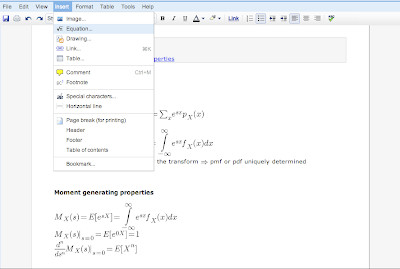
We created an equation editor so you can easily complete problem sets online or write papers that include equations. If you're taking math, you can now take notes in class or answer questions using Google Docs.

In the same vein, we also added superscripts and subscripts — perfect for expressing chemical compounds or algebraic expressions:
For language enthusiasts, we integrated translation features into Google Docs. You can translate either a single word or an entire document — handy for making sure you're on the right track when writing those foreign language essays.
For those of you conducting surveys, we added a "Go to page based on answer" option in Google forms, making it easy to show participants only those questions that are relevant to them.

For language enthusiasts, we integrated translation features into Google Docs. You can translate either a single word or an entire document — handy for making sure you're on the right track when writing those foreign language essays.
For those of you conducting surveys, we added a "Go to page based on answer" option in Google forms, making it easy to show participants only those questions that are relevant to them.

We also came up with a few features for humanities buffs. To make outlining term papers more customizable, we made it easy to select different bulleting styles for lists by adding an option to the format menu. And when that paper is written and ready to turn in, you now have the option to print footnotes as endnotes for a cleaner-looking paper.
We hope these new features make collaboration in Google Docs even more convenient, whether you're editing group presentations from across campus or collecting survey data from friends. In fact, we've created this video to show how collaboration can even help you out with your "extracurricular" activities:
We hope these new features make collaboration in Google Docs even more convenient, whether you're editing group presentations from across campus or collecting survey data from friends. In fact, we've created this video to show how collaboration can even help you out with your "extracurricular" activities:
Tuesday, September 8, 2009
Five million students going back to school are "going Google"
(Cross-posted on the Google Students Blog)
It's always tough to bid farewell to summer and hit the books again, but for a few million students this back-to-school season, things are looking up. As of this fall, over five million students at thousands of schools in more than 145 countries have "gone Google" and are actively using Google Apps Education Edition on campus. Since this time last year the number of students using Google Apps on campus has increased by 400%. Because more schools sign up for Apps everyday, we wanted to celebrate the start of the 2009 school year by launching a new site that shows off some of these schools, provides product tips and tricks, introduces a community discussion forum and more.

When you visit the site, you'll also find an interactive map packed with interesting trivia. For example, in addition to the 70,000 students using Apps at Temple University, their 5,000 staff and faculty were given a choice between Gmail and alternative vendor, and over 90% chose to go Google. Or when Kent State first deployed, they saw more than 700 students migrating each hour. And a single admin at Montana State successfully deployed over 30,000 accounts in less than 90 days. Or as we learned in the recent webinar from another school on the map — Notre Dame — they saved $1.5 million by switching to Apps. You can hear their full story in this video:
We hope more schools will continue to go Google and bring Apps to their campuses in an effort to improve communication and collaboration while cutting costs and resources. In the meantime, check out our site and find out what Apps has done for other schools and what Apps can do for your school — and if you're already a part of the movement, add yourself to the map!
It's always tough to bid farewell to summer and hit the books again, but for a few million students this back-to-school season, things are looking up. As of this fall, over five million students at thousands of schools in more than 145 countries have "gone Google" and are actively using Google Apps Education Edition on campus. Since this time last year the number of students using Google Apps on campus has increased by 400%. Because more schools sign up for Apps everyday, we wanted to celebrate the start of the 2009 school year by launching a new site that shows off some of these schools, provides product tips and tricks, introduces a community discussion forum and more.
A snapshot of some of the thousands of schools "going Google" this fall. Every location in green indicates Apps users.
When you visit the site, you'll also find an interactive map packed with interesting trivia. For example, in addition to the 70,000 students using Apps at Temple University, their 5,000 staff and faculty were given a choice between Gmail and alternative vendor, and over 90% chose to go Google. Or when Kent State first deployed, they saw more than 700 students migrating each hour. And a single admin at Montana State successfully deployed over 30,000 accounts in less than 90 days. Or as we learned in the recent webinar from another school on the map — Notre Dame — they saved $1.5 million by switching to Apps. You can hear their full story in this video:
We hope more schools will continue to go Google and bring Apps to their campuses in an effort to improve communication and collaboration while cutting costs and resources. In the meantime, check out our site and find out what Apps has done for other schools and what Apps can do for your school — and if you're already a part of the movement, add yourself to the map!
Wednesday, September 2, 2009
Happy 10th birthday, Blogger
Much has changed since Blogger was released in August of 1999. Writing about Blogger's founding in his book Say Everything, Scott Rosenberg describes the effect of Blogger simply: "It cleared the obstacles from the path between brain and Web page." As the phenomenon of blogging has grown and evolved over the past ten years, so too has Blogger, adapting to a world of fast-paced communication and allowing millions to tell their stories. When Google acquired Blogger in February of 2003, about 250,000 people visited Blogger per month. Today, that number is more than 300 million.
In our announcement about the Blogger acquisition, we said (somewhat ironically, not in a blog post — the Official Google Blog was still more than a year away): "Blogs are a global self-publishing phenomenon that connect Internet users with dynamic, diverse points of view while also enabling comment and participation." We're proud that Blogger continues to be a force for free expression worldwide and that it is growing quickly despite its maturity. In the past two years alone, the number of people contributing to a blog has more than doubled, and every second of every day, a new blog is created on Blogger.
To commemorate Blogger's 10th birthday, we've been releasing birthday presents as our way of saying thanks to the millions of users who have made Blogger what it is today. So far, we have released 5 presents and today we're announcing 2 more, courtesy of two Blogger partners:
In our announcement about the Blogger acquisition, we said (somewhat ironically, not in a blog post — the Official Google Blog was still more than a year away): "Blogs are a global self-publishing phenomenon that connect Internet users with dynamic, diverse points of view while also enabling comment and participation." We're proud that Blogger continues to be a force for free expression worldwide and that it is growing quickly despite its maturity. In the past two years alone, the number of people contributing to a blog has more than doubled, and every second of every day, a new blog is created on Blogger.
To commemorate Blogger's 10th birthday, we've been releasing birthday presents as our way of saying thanks to the millions of users who have made Blogger what it is today. So far, we have released 5 presents and today we're announcing 2 more, courtesy of two Blogger partners:
- Socialvibe: When Socialvibe approached us about finding a way to empower the Blogger community to help raise funds for charities, we couldn't pass up the opportunity to leverage Blogger's reach to do some good. Starting this week, Blogger users can show their support for charities and raise funds by adding a gadget to their blog. The Socialvibe team has challenged us to raise $50,000 for charity by the end of the year, and we're pretty confident we can beat that.
- InfoThinker: If you have an iPhone or iPod Touch and a Blogger blog, you're in luck. The team at InfoThinker (makers of the iPhone app BlogPress) was eager to help celebrate Blogger's birthday. Earlier this week they submitted a free version of BlogPress that works only on Blogger to the iPhone App Store. Blogging on the go has never been so easy! Keep an eye out for the app.
Monday, August 17, 2009
Sharing with Google Groups
As more and more businesses and organizations "go Google," we find that many of the features we develop based on feedback from large enterprises end up benefiting all of our users. We recently rolled out improvements to the way Google Groups interacts with several of our applications. Now, sharing calendars, sites and documents with multiple people is easy — instead of adding people one at a time, you can simply share with an entire Google Group.
As an example, imagine you're organizing a local intramural softball team tournament. You use Google Docs to keep track of the rosters for each team as well as each team's performance.

You want all the players, but only the players, to have editing access. You already have a Google Group set up with the tournament participants, so you simply share the spreadsheet with the group itself, granting the group members permission to edit.


Now, when people join or leave the Google Group, they will automatically gain or lose editing access to the spreadsheet. It's that easy.
This was a feature that people wanted to "just work" — and now it does. Go ahead and try it out with your sites, calendars and documents!
As an example, imagine you're organizing a local intramural softball team tournament. You use Google Docs to keep track of the rosters for each team as well as each team's performance.

You want all the players, but only the players, to have editing access. You already have a Google Group set up with the tournament participants, so you simply share the spreadsheet with the group itself, granting the group members permission to edit.


Now, when people join or leave the Google Group, they will automatically gain or lose editing access to the spreadsheet. It's that easy.
This was a feature that people wanted to "just work" — and now it does. Go ahead and try it out with your sites, calendars and documents!
Monday, August 3, 2009
"Going Google" with Google Apps
Every morning, millions of people wake up to a very refreshing experience at work. They don't see "mailbox is full" errors in their email. They don't worry about backing up their data. They can get to any file they need from any computer, anywhere with Internet access and a browser. They can all access and edit the same documents and spreadsheets at the same time as their colleagues. They use Gmail and Google Calendar at work as fluidly and easily as they use their personal Gmail accounts. They video, voice and text chat with their peers globally as naturally as they send email.
The IT people at these companies and organizations don't waste time or money buying, installing or managing email servers. They focus on the smart, innovative stuff they want to work on, because they never have to bother with expensive and painful software upgrades, hardware compatibility issues or managing data centers. They have left many IT frustrations and costs behind and moved on to something better.
Here at Google, we have a term for the moment a company realizes there's a better way and goes for it: "going Google." Over 1.75 million businesses, schools and organizations have gone Google — including Motorola, University of Notre Dame, the Mercy Corps and many more — and each day, 3,000 more organizations join them. We want every organization to understand the benefits of going Google, so today we're telling the story in a new way. We're kicking off a series of outdoor billboards in four cities — Boston, Chicago, New York and San Francisco — that will change every weekday for the next four weeks. The billboards tell the story of an anonymous IT manager who gets so fed up with the typical IT status quo that his company eventually — you guessed it — goes Google. Here's a preview:
Visit www.google.com/appsatwork to get more information about the benefits of going Google. Already gone Google? Tweet your story and check out our tools to help spread the word.
The IT people at these companies and organizations don't waste time or money buying, installing or managing email servers. They focus on the smart, innovative stuff they want to work on, because they never have to bother with expensive and painful software upgrades, hardware compatibility issues or managing data centers. They have left many IT frustrations and costs behind and moved on to something better.
Here at Google, we have a term for the moment a company realizes there's a better way and goes for it: "going Google." Over 1.75 million businesses, schools and organizations have gone Google — including Motorola, University of Notre Dame, the Mercy Corps and many more — and each day, 3,000 more organizations join them. We want every organization to understand the benefits of going Google, so today we're telling the story in a new way. We're kicking off a series of outdoor billboards in four cities — Boston, Chicago, New York and San Francisco — that will change every weekday for the next four weeks. The billboards tell the story of an anonymous IT manager who gets so fed up with the typical IT status quo that his company eventually — you guessed it — goes Google. Here's a preview:
Visit www.google.com/appsatwork to get more information about the benefits of going Google. Already gone Google? Tweet your story and check out our tools to help spread the word.
Subscribe to:
Posts (Atom)